Turning the Page: A New and Improved Digital Experience for the Morgan Library & Museum
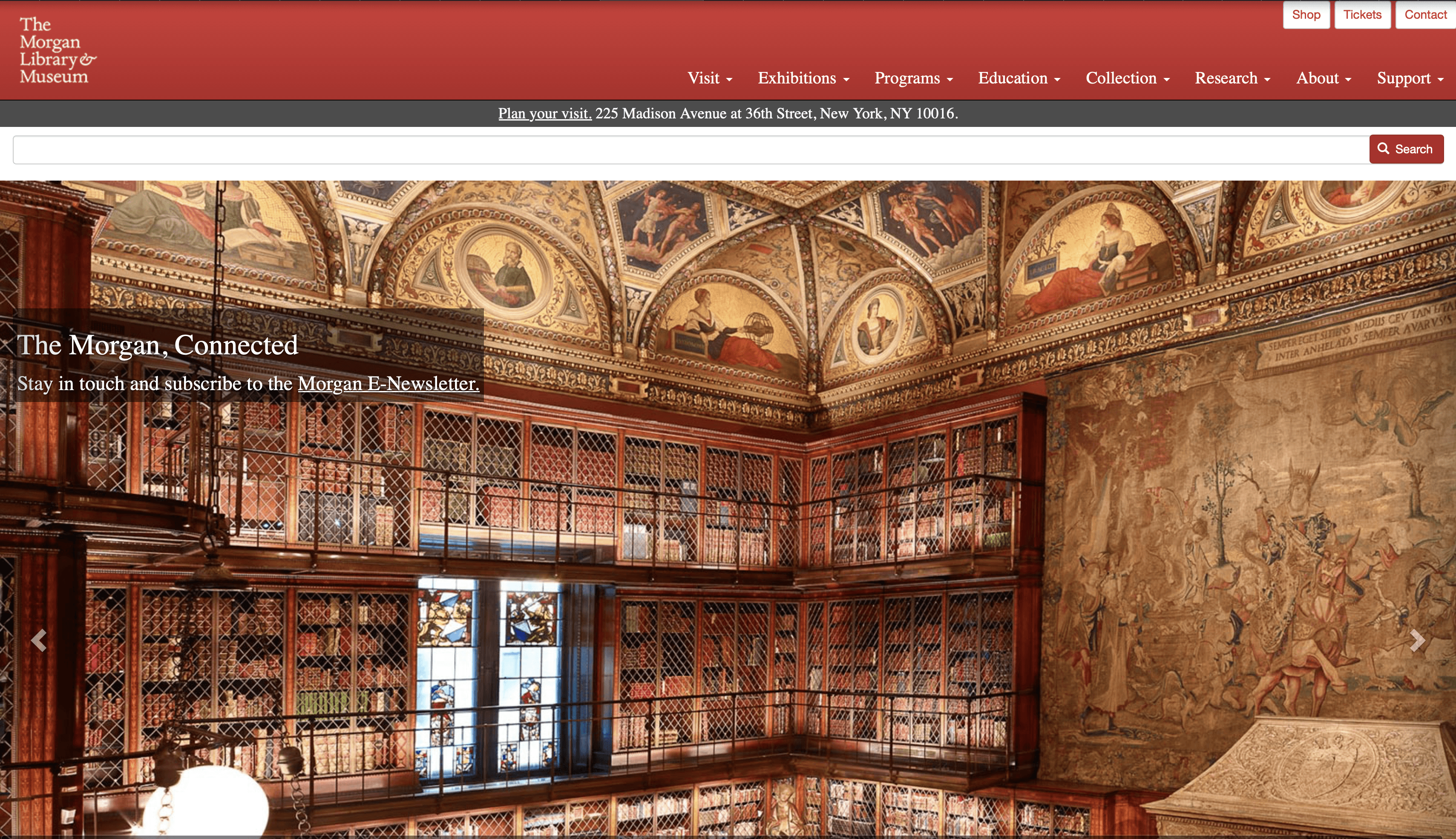
Expectations for a great, at minimum good, online experience are at an all time high in today’s digital age. Physical locales must communicate not only their offerings, but their brand and identity in a cohesive manner to online viewers if they want any chance at bringing them to an in-person experience. A place’s online presence is an extension of them and to effectively control that presence and make it shine is essential for creating a positive whole experience for every visitor. This case study explores a redesign of the the Morgan Library & Museum website.
16 weeks
4 UX designers
User Experience Designer/ Product Designer/User Experience Researcher
academic / n/a
UX Metrics, Figma
User Interviews, Affinity Diagramming, Competitive Analysis, Card Sorting, Tree Testing, Wireframing, Prototyping, Usability Testing, Iterative Design, Interaction Design
Challenge
The Morgan Library & Museum, with its rich history, brings visitors from New York and beyond to see its collection of over 350,000 objects. The museum’s website is an essential touch point for visitors and is an extension of the Morgan itself.
The current website, however, is under serving its visitors with an outdated look and feel and often-confusing navigation options. A poorly designed site can significantly hinder its users and make finding essential information difficult.
Key Issues We Identified:
Confusing information architecture/navigation bar
Outdated Typography
Cluttered Layout
Excessive text
Background
The Morgan Library & Museum is a research library and museum located in Manhattan, New York City, with a rich history dating back to 1906. The Morgan sees over 250,000 visitors on-site and over 7 million online each year. Recently, the museum published its strategic plan, outlining priorities and objectives for the next 5 years. Among its core priorities in the plan, goals for technological capacity & capabilities were identified.
Strategic Plan Website Priorities:
“Articulate and implement a digital engagement strategy encouraging meaningful visitor participation both on-site and online”.
“Broadcast a distinctive and engaging Morgan identity across the website and other digital platforms.”
“Forge bonds with younger, more diverse audiences.”
Step 1: Understanding Our Users
User Interviews: We conducted user interviews to understand more about users' experiences with museums and museum websites. We aimed to recruit participants primarily with the 18-35 age range to meet the Morgan's strategic goal of reaching a younger audience.
Key questions we asked users:
How do they find necessary information on a museum website?
What information is the most important to them to be able to find?
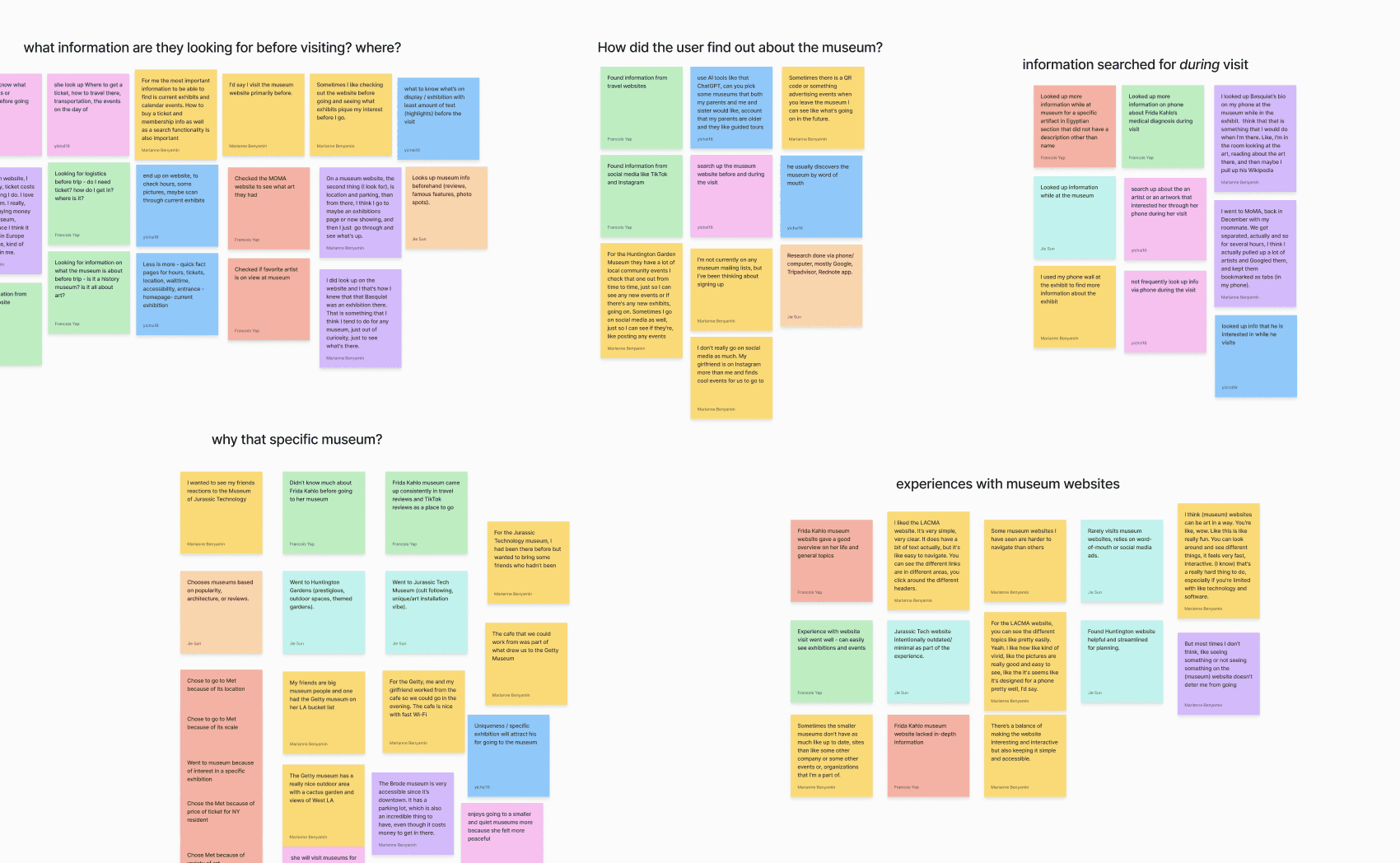
Affinity Diagramming: Based on the user interview research findings, we pulled key data points from each interview and created an affinity diagram to identify key themes.
Who are our users and what do they want?
Who are our users?
All of the users our team interviewed are between 18-35 years old.
All of the users we spoke to live in or outside of major cities in the US.
Users typically visit on the weekend or during holidays and trips.
What do users want?
Seamless Ticket Purchasing: Users want to easily be able to purchase a ticket (either in person or online beforehand).
Easy to Find Information: Users want to be able to find specific information on a museum website such as ticket cost, availability of tickets, how to purchase a ticket, location, exhibits on display, and special events.
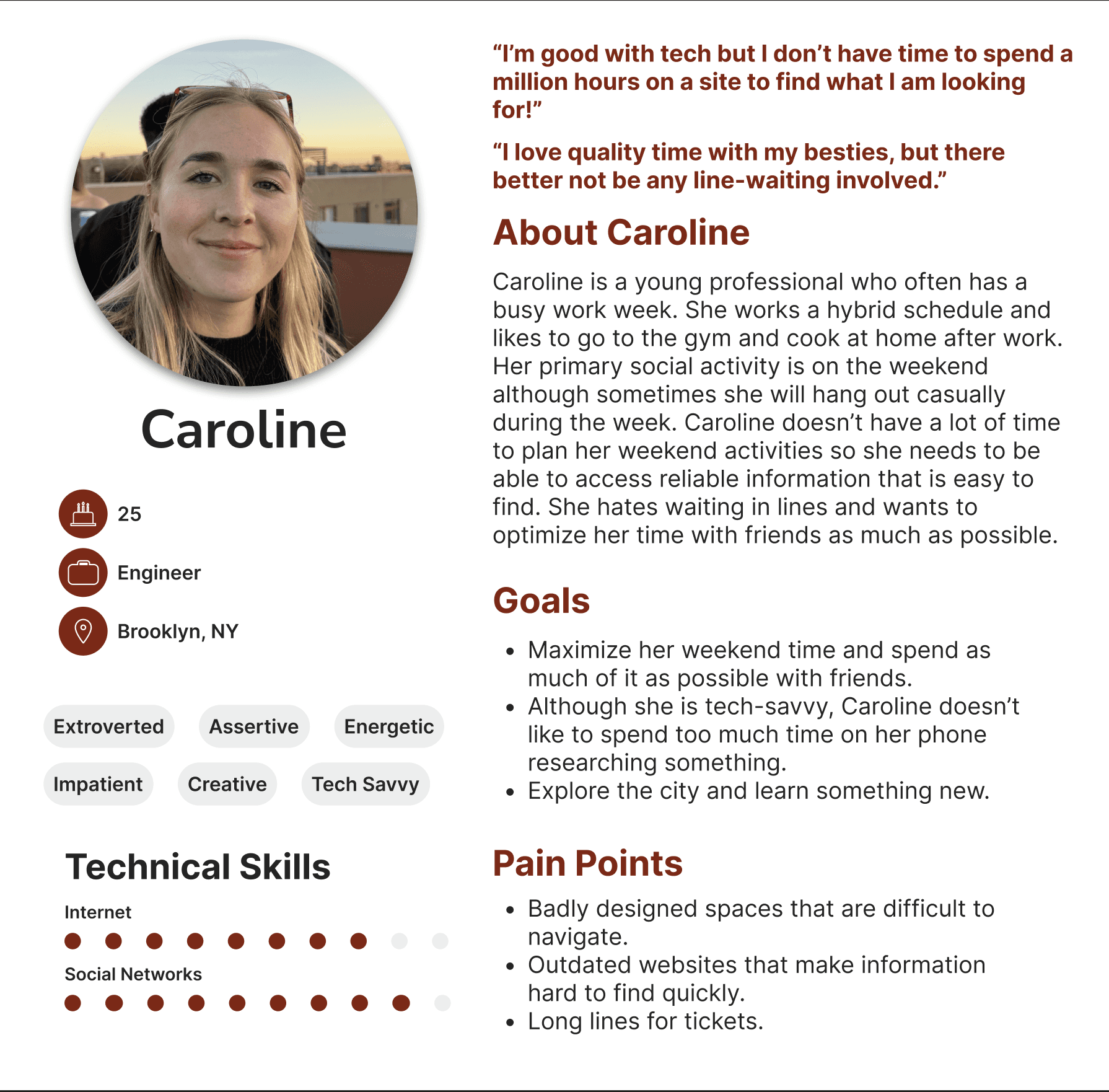
Artifacts from Step 1 included our affinity diagram and personas both used to distill user insights. Both are pictured below.
Step 2: Understanding the Competitive Landscape
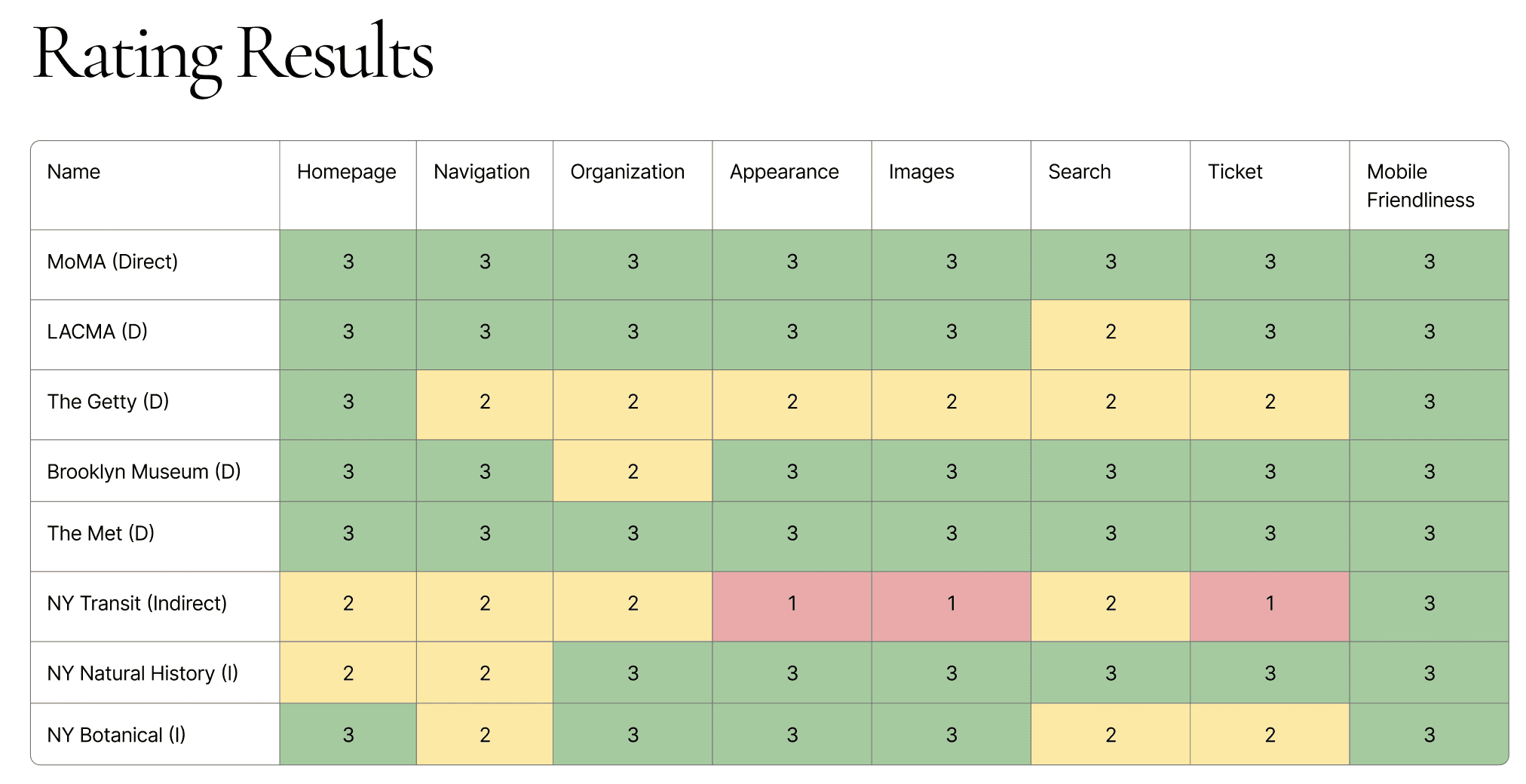
Competitive Analysis: We conducted a competitive analysis of The Morgan Library and Museum website against direct competitors in the historical and art museum sector. We also considered indirect competition such as botanical gardens and science-oriented museums.
How did we assess competitors?
We first chose a mix of indirect and direct competitors, including other major nyc museums such as The Met and the MoMA.
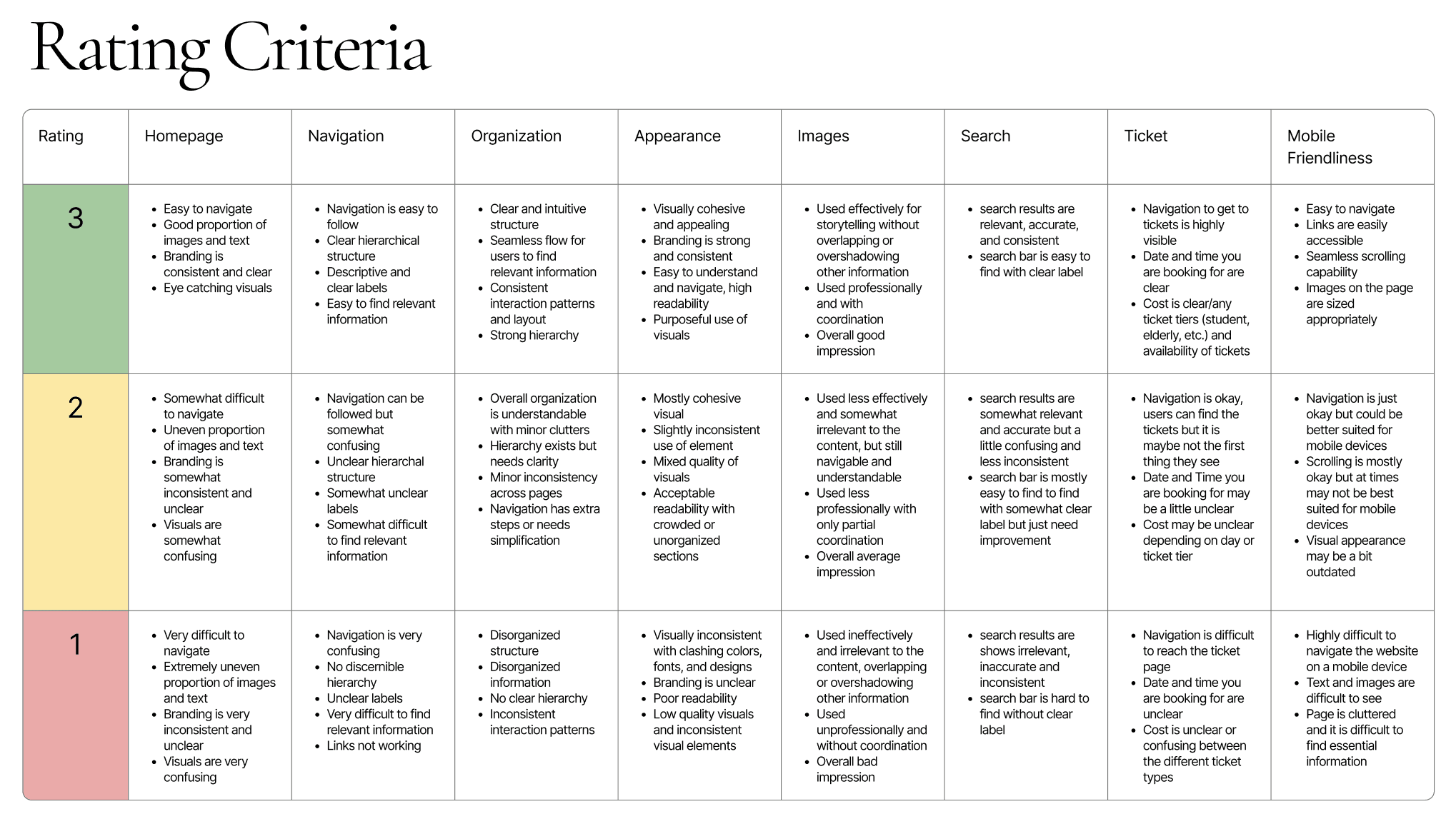
We then came up with detailed criteria for 8 key dimensions we evaluated competitors on.
Last we decided on 4 key dimensions for recommendations: homepage, navigation, appearance, and mobile friendliness.
What did we learn from our competitive analysis?
Our 4 Key Recommendation Areas:
Homepage:
Improve uneven proportion of images and texts
Keep large, eye-catching main visual followed by smaller visuals of exhibits
Address awkward spacing
Improve navigation to be more intuitive
Remove multiple CTAs and prioritize one to be highlighted
Keep branding and vision clear
Navigation:
Simplify the navigation bar: Remove duplicate call-to-action buttons to reduce confusion
Use clear labels: Replace vague or inconsistent terms with descriptive wording
Highlight essentials: Highlight the “Ticket” Button with different color
Appearance:
Develop a strong brand identity
Cohesive color palette
Appealing visual elements
Typography that preserves the brand but is more modern
Organize content structure with suitable layout and display methods
Create a more clear visual hierarchy
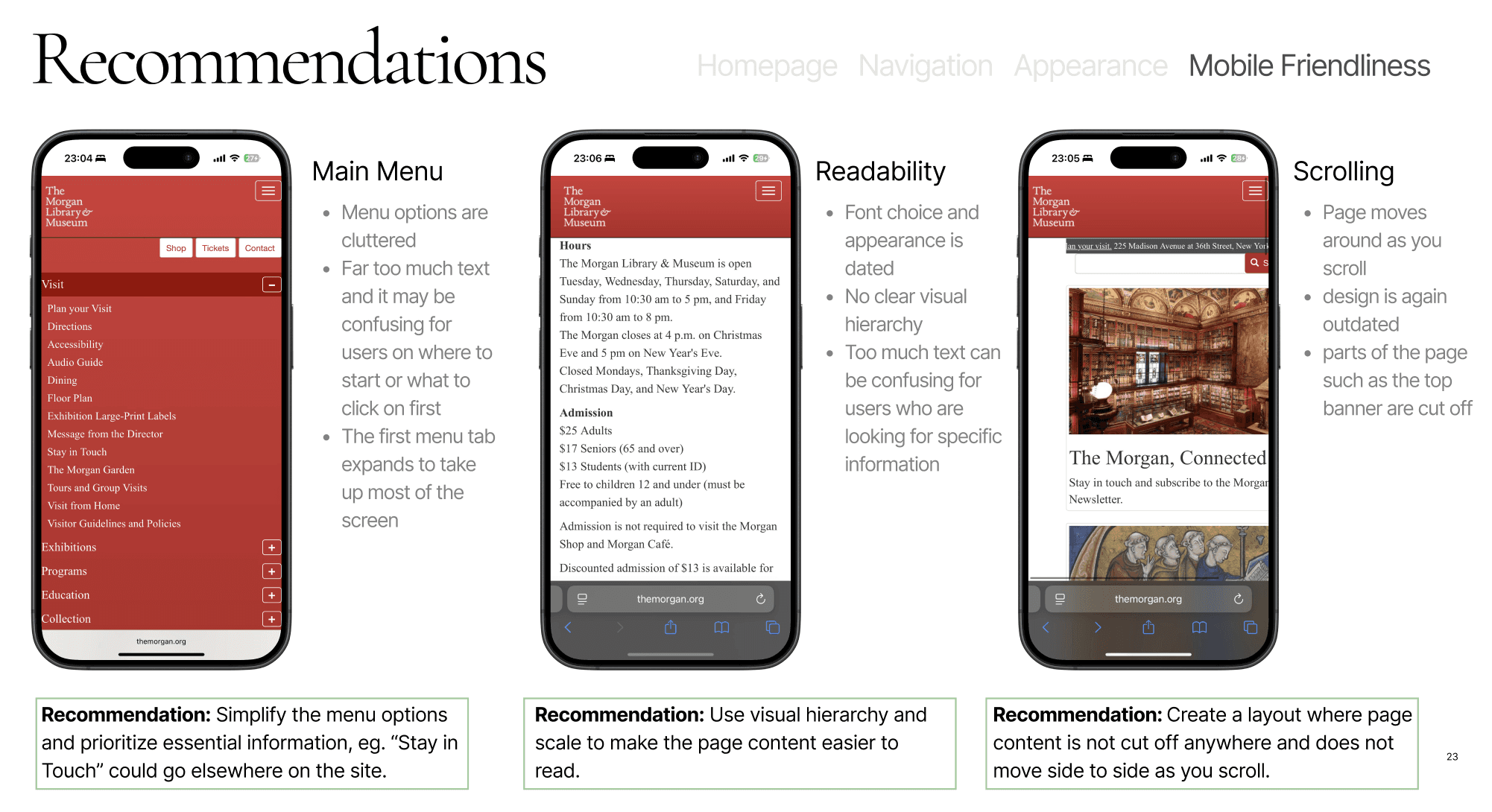
Mobile Friendliness:
Main menu: Simplify the menu options and prioritize essential information, eg. “Stay in Touch” could go elsewhere on the site.
Readability: Use visual hierarchy and scale to make the page content easier to read.
Scrolling: Create a layout where page content is not cut off anywhere and does not move side to side as you scroll.
Step 3: Starting with the Foundation: Website Information Architecture (IA)
What's wrong with the current site structure?
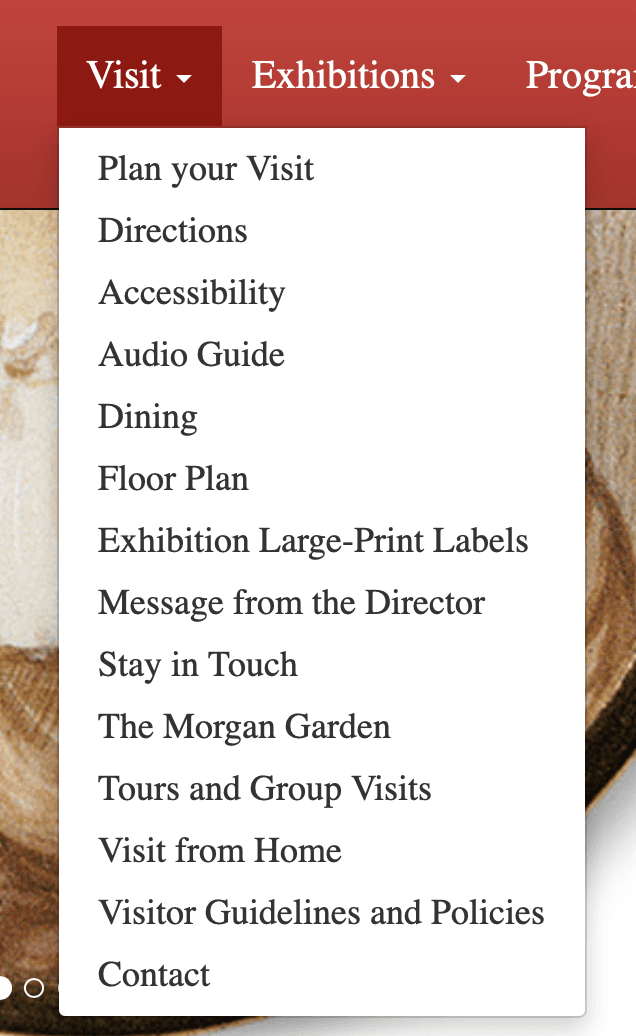
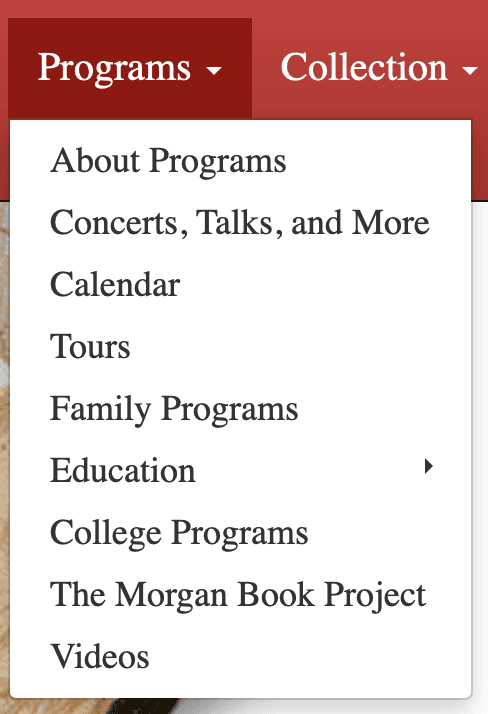
Issues with the current site IA:
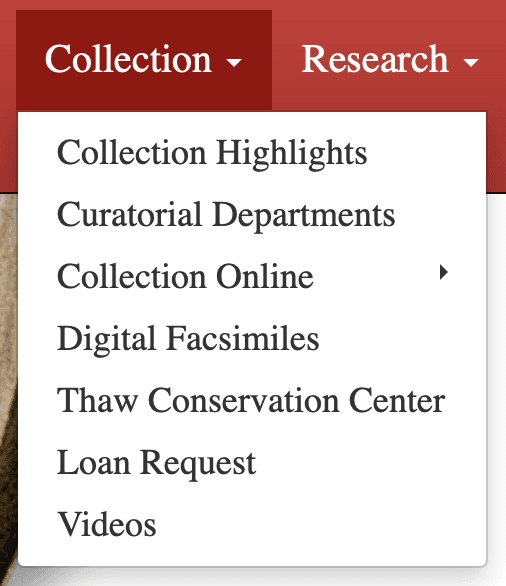
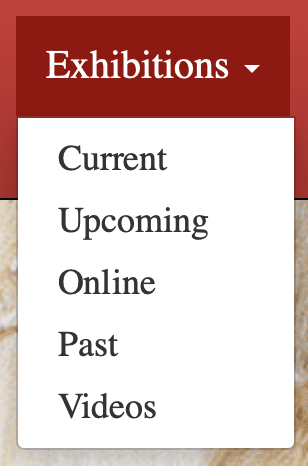
The Morgan website has an overwhelming number of navigation options, causing cognitive overload for potential visitors.
The hierarchical structure is very unclear, especially on the second level navigation.
The page labels are confusing and often misleading.
How did we create a better IA?
Card Sorting!
To start…
We audited the Morgan’s current website content and structure.
We then renamed the content to be more representative and understandable, yet still accurately depict the terms and pages.
We also selectively removed jargon, redundant, or unimportant content that would confuse users.
Next we…
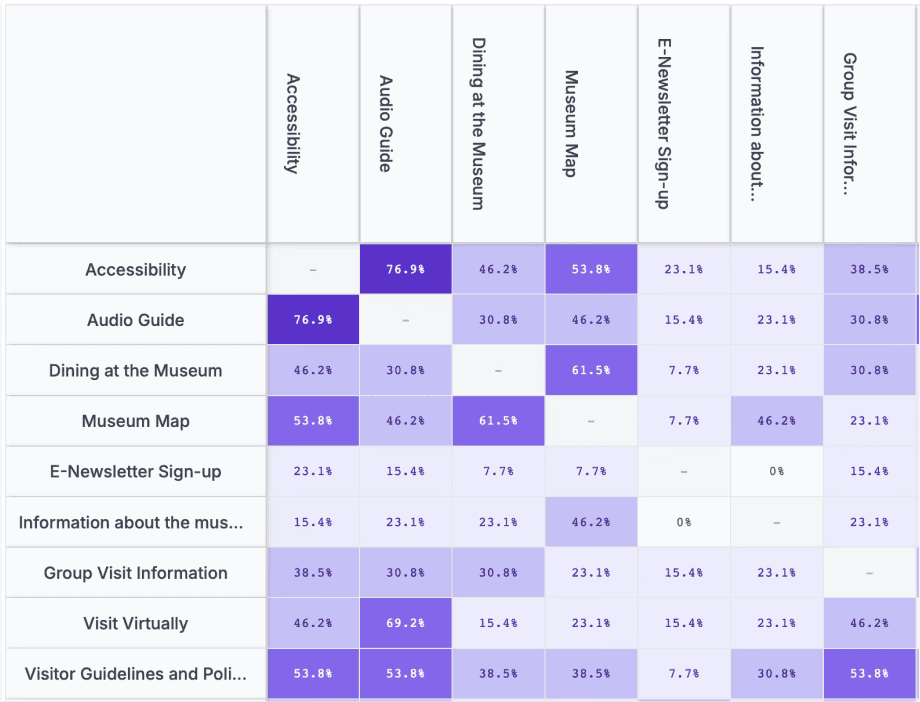
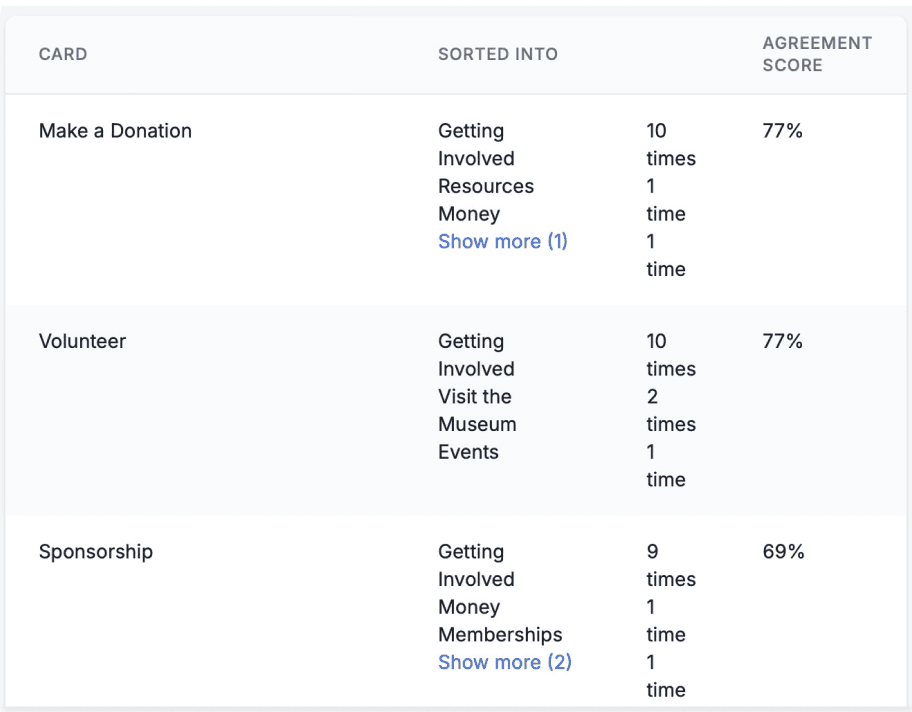
Had 13 participants sort the cards into groups
Conducted 4 moderated card sorting sessions
Ended up with 47 unique groups created by participants
What did we learn from card sorting?
Users had slightly different mental models, many of them grouped the cards by function- for example, they grouped cards that had an action associated with them together
Some labels may have been unclear still as participants did not know quite what to do with some of the cards
How did we test our new IA?
Tree Testing!
Tree Testing Goals
Test the site’s usability by validating its navigation structure.
Evaluate if the structures of the site and hierarchy align with users’ expectations.
Identify labels that may be unclear, misleading, or confusing to users.
Improve overall efficiency to help user find the information they need more easily.
Was our new IA successful?
Kind of…
We had to do two rounds of tree testing! Why? Our first tree test was not that successful, so we revised our questions and IA to test again.
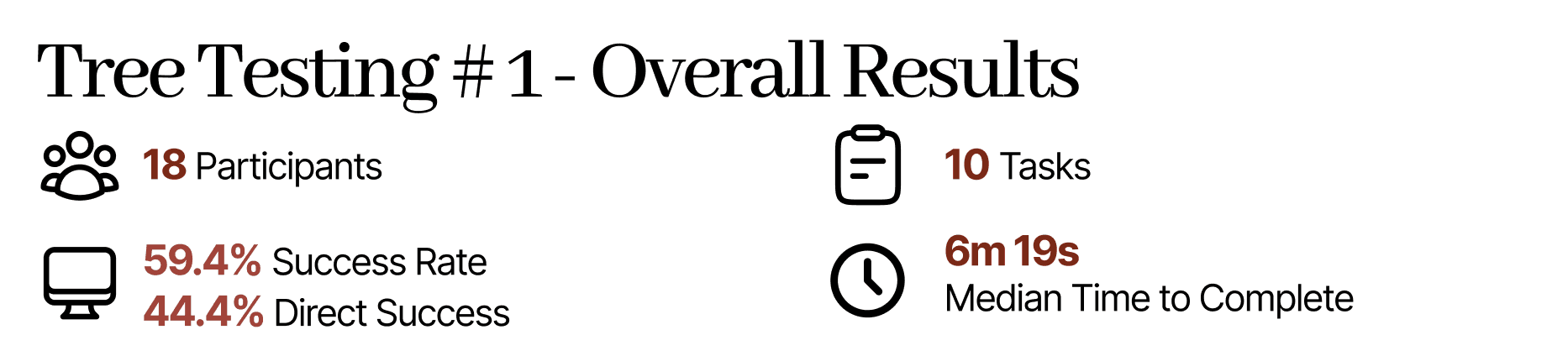
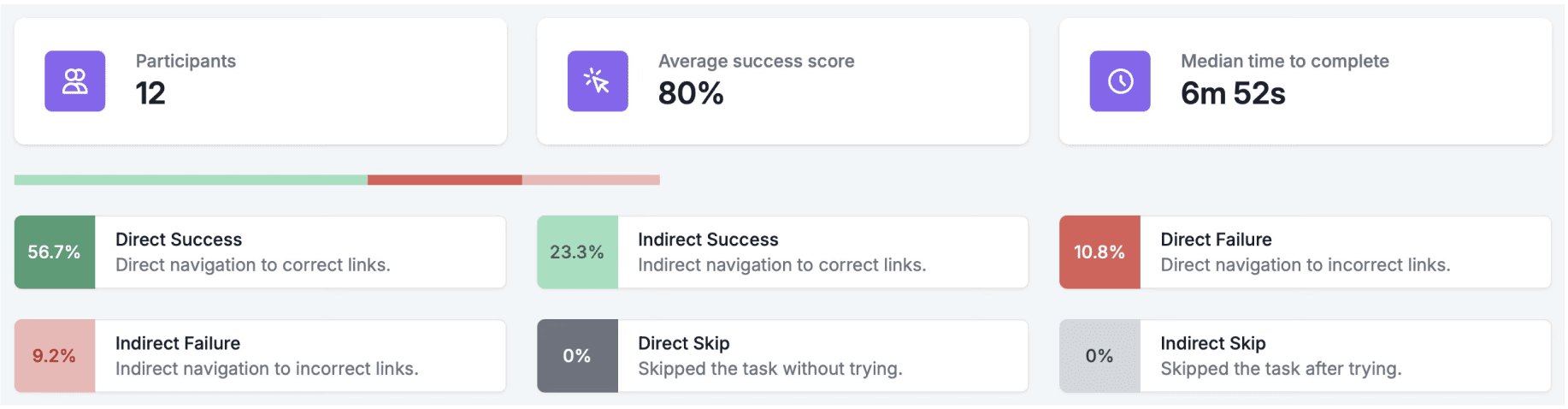
Thankfully, tree test round 2 was much more successful! However, some things didn’t improve as much as we thought they would because our testing group did not include researchers for example.
Our Final Information Architecture
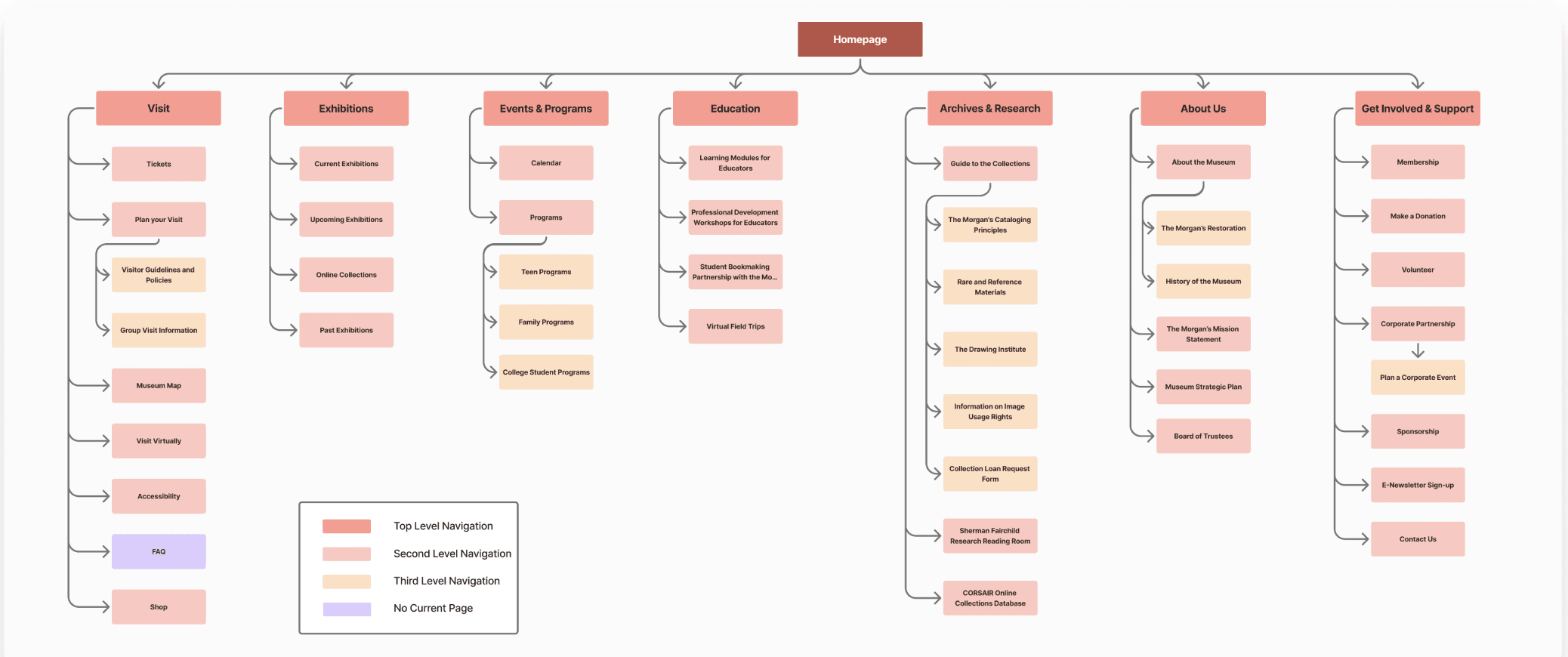
What did we change?
Key Changes:
Simplified top level navigation from 8 to 7
removed redundant labels or grouped under different pages rather than standalone pages
Progressive disclosure
Labeling with more context where needed
Step 4: Putting up the Structure: Wireframing, Prototyping, and Usability Testing
What was our process?
User Flow —> Initial Wireframing —> Prototyping —> Usability Testing —> More Prototyping
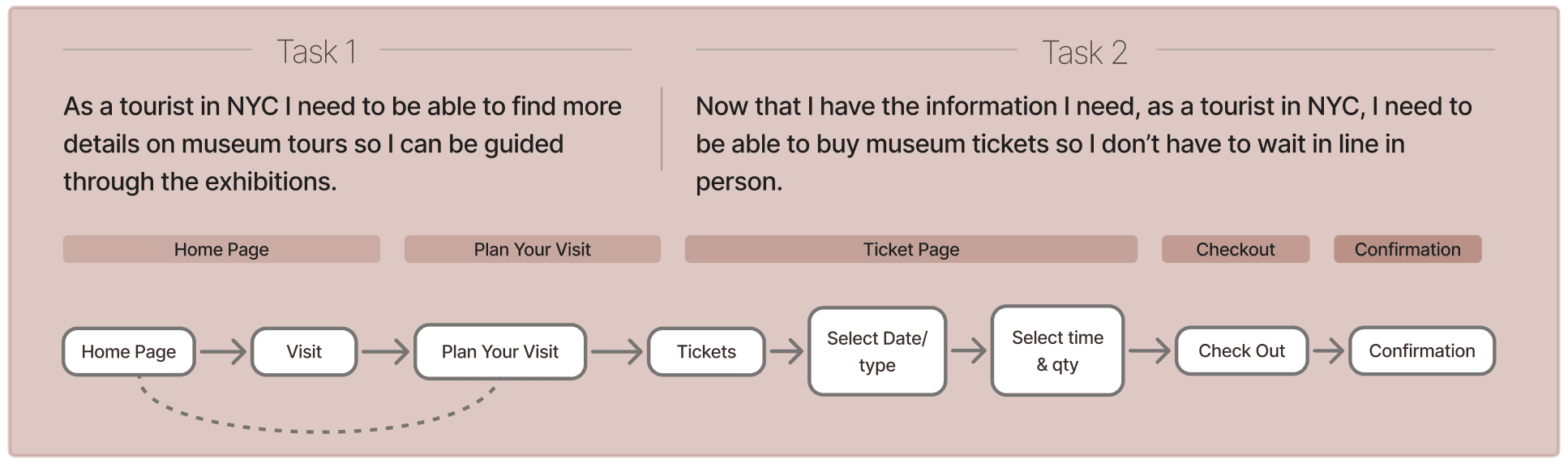
Some Notes:
We didn’t find a UI kit that we really liked, so we made most of our components manually
Usability testing
We made the same mistake as the Morgan in some places, the Plan Your Visit page had a lot of content that we consolidated from what used to be standalone pages in some cases
Added in things like accordions to hide away potentially unneeded information
Visual hierarchy issues
Functionality issues → we couldn’t do everything but we needed to test
Additional Prototyping
You can always keep prototyping, learning how to create more complex and interactive components in figma for a more seamless prototype
A lot of review and team working sessions!
Our Key Design Decisions
Plan Your Visit Page
Many users we spoke to in our initial user interviews mentioned wanting to prioritize finding essential information such as hours and location. We put this information at the top of the "Plan Your Visit" page and also provided jump links so users can easily navigate to other sections of the page.
During the five usability tests our team conducted, majority of users noted that the "Plan Your Visit" page was content heavy. To minimize the amount of text users are presented with, we incorporated accordions specifically in the "Directions" section of the page to hide away information users might not need.
Purchasing Tickets
We introduced a calendar view within the ticket flow to mirror competitor practices and make date selection more intuitive than the existing list approach.
Our user research shows that people typically visit museum websites for ticket logistics and to view exhibitions & events. Showing events available on the selected day increases the likelihood that users will also purchase event tickets alongside general admission.
Checkout Page
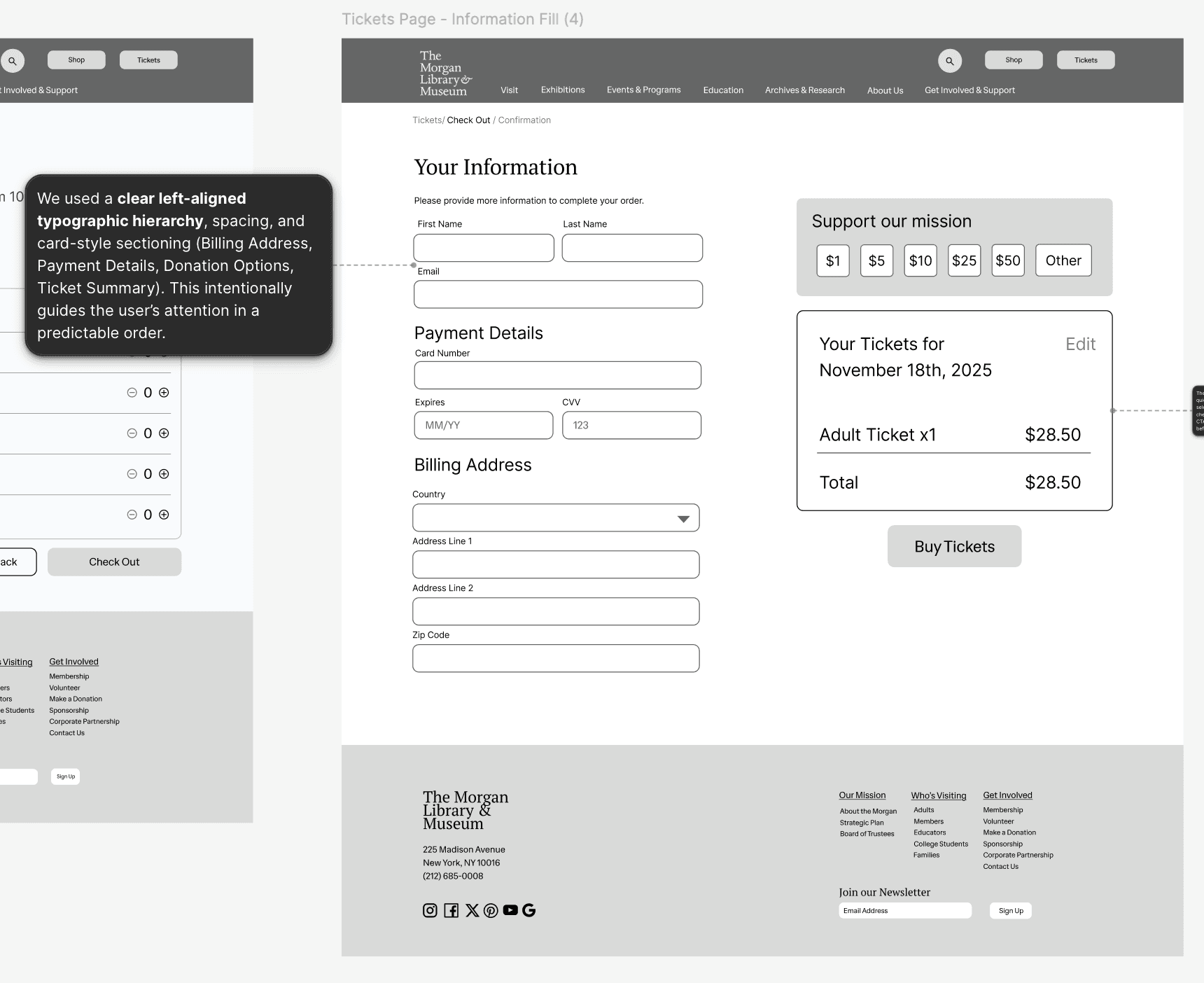
We used a clear left-aligned typographic hierarchy, spacing, and card-style sectioning (Billing Address, Payment Details, Donation Options, Ticket Summary). This intentionally guides the user’s attention in a predictable order.
We used a clear left-aligned typographic hierarchy, spacing, and card-style sectioning (Billing Address, Payment Details, Donation Options, Ticket Summary). This intentionally guides the user’s attention in a predictable order.
Confirmation Page
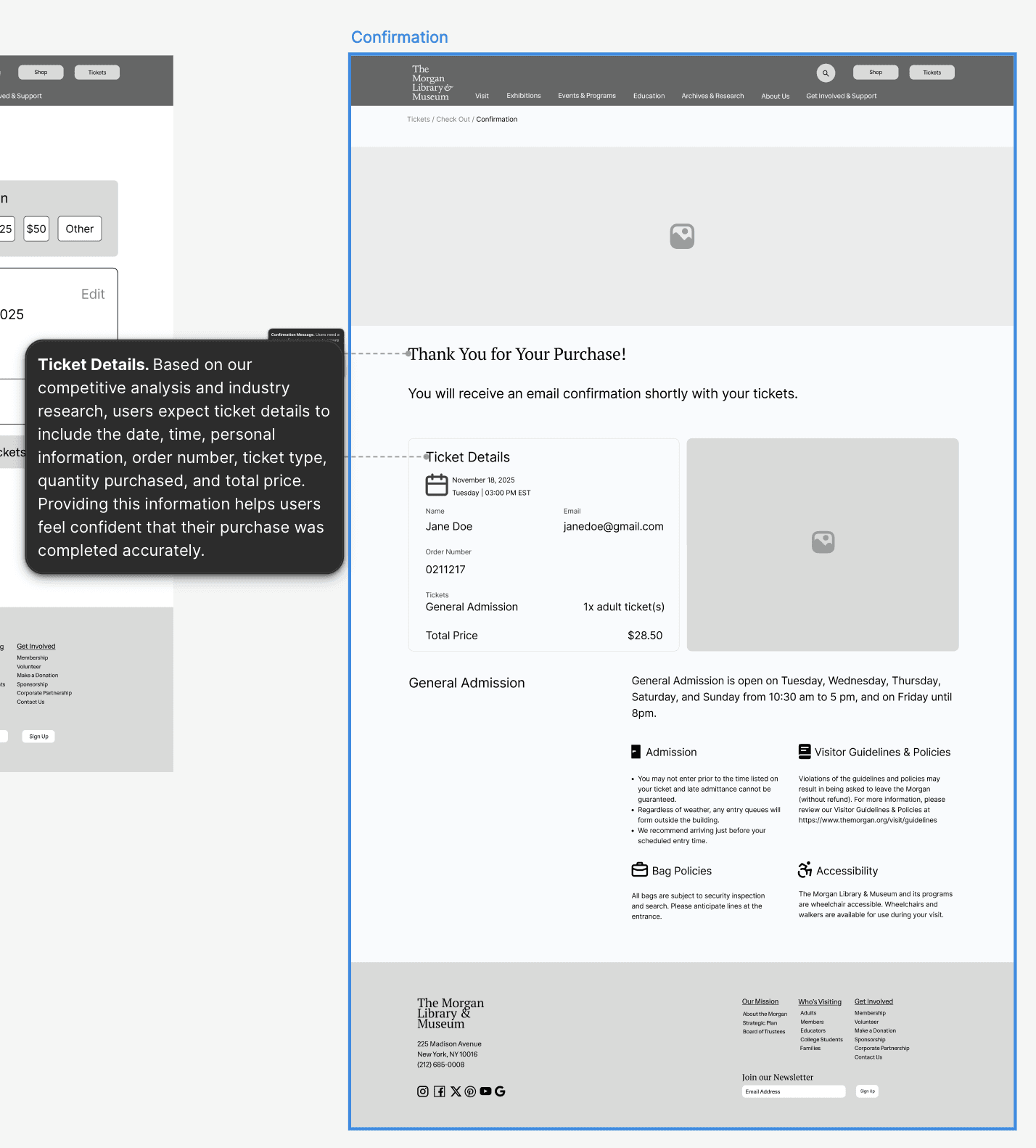
Confirmation Message. Users need a clear confirmation message to ensure their ticket purchase was successful. The original message, “Thank you & Welcome,” confused several users during testing, as the original prompt did not directly confirm the completion of their purchase.
Ticket Details. Based on our competitive analysis users expect ticket details to include the date, time, personal information, order number, ticket type, quantity purchased, and total price. Providing this information helps users feel confident that their purchase was completed accurately.
And lastly…what did I learn?
Key Lessons Learned:
MVP for the MVP!
Sometimes you have tighter time constraints and some testing is better than no testing at all. You can't wait for your prototype to be perfect to start testing it and sometimes the minimum viable product or MVP is where you have to start!
Test again and again and again!
Constantly test your prototype! Things change and things break, especially when working on a prototype with multiple people. To ensure your prototype remains functional, keep testing.
You can always keep prototyping!
Is there ever a true final prototype? Perhaps not, you can always keep improving upon your designs and keep iterating. There is no real stopping point.
Usability Testing can be heartbreaking…
That one feature you spent over an hour trying to get to work… Oh yeah, the user didn't even mouse over it. Unfortunately, users will not use all the features or navigation options you design. Everyone has a different mental model and past experiences are a major influence of how they use a product. But either way, you learned how to do something new.